


TWINPORT IO card Settings and Configuration
ARNET CORPORATION
TWINPORT
Card Type | Serial controller |
Chipset/Controller | Startech |
I/O Options | Serial ports (2) |
Maximum DRAM | N/A |
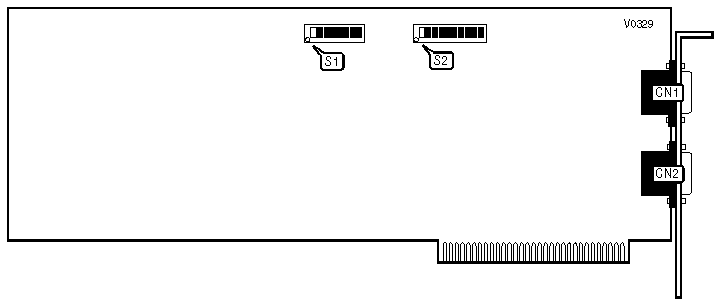
CONNECTIONS | |||
Purpose | Location | Purpose | Location |
Serial port 2 | CN1 | Serial port 1 | CN2 |
SERIAL PORT CONFIGURATION | |||
Port 1 (CN2) | Port 2 (CN1) | S1 | S2 |
COM1 | COM2 | 1, 2, 3, 5, & 6 on | 1 & 2 On |
COM1 | Disabled | 1, 2, 3, & 5 on | 1 On |
Disabled | COM2 | 1, 2, 3, & 6 on | 2 On |
Disabled | Disabled | All Off | N/A |
Note:All switch keys other than those designated as on for a particular configuration should be put in the Off position. | |||
I/O ADDRESS SELECT | |||||||
Port 1 (CN2) | Port 2 (CN1) | Option | S1/1 | S1/2 | S1/3 | S1/7 | S1/8 |
100h | 108h | 140h | Off | Off | Off | Off | Off |
180h | 188h | 1C0h | Off | Off | On | Off | Off |
200h | 208h | 240h | Off | On | Off | Off | Off |
200h | 208h | 2D0h | Off | On | On | Off | Off |
280h | 288h | 2C0h | On | Off | Off | Off | Off |
280h | 288h | 300h | On | Off | On | Off | Off |
300h | 308h | 340h | On | On | Off | Off | Off |
3F8h | 2F8h | 340h | On | On | On | Off | Off |
OPTION I/O SPACE CONFIGURATION | |
Setting | S1/4 |
Enabled | On |
Disabled | Off |
I/O ADDRESS SELECT | ||||||||
Port 1 (CN2) | Port 2 (CN1) | S1/1 | S1/2 | S1/3 | S1/4 | S1/5 | S1/6 | S1/7 |
IRQ4 | IRQ3 | On | On | Off | Off | Off | Off | Off |
IRQ2 | IRQ2 | Off | Off | On | Off | Off | Off | Off |
IRQ3 | IRQ3 | Off | Off | Off | On | Off | Off | Off |
IRQ4 | IRQ4 | Off | Off | Off | Off | On | Off | Off |
IRQ5 | IRQ5 | Off | Off | Off | Off | Off | On | Off |
IRQ7 | IRQ7 | Off | Off | Off | Off | Off | Off | On |
FORMULA IV OPERATING SYSTEM SETTINGS | ||||
UART Address | Option I/O Address | IRQ | S1 | S2 |
280h | N/A | IRQ2 | 1, 5 & 6 on | 3 on |
Note:All switch keys other than those designated as on for a particular configuration should be put in the Off position. | ||||
MBOS/5, BOS/LAN OPERATING SYSTEM SETTINGS | |||||
UART Address | Option I/O Address | IRQ | S1 | S2 | |
| » | 100h | N/A | IRQ2 | 5 & 6 on | 3 on |
200h | N/A | IRQ2 | 2, 5 & 6 on | 3 on | |
Note:All switch keys other than those designated as on for a particular configuration should be put in the Off position. | |||||
MUC-DOS OPERATING SYSTEM SETTINGS | |||||
UART Address | Option I/O Address | IRQ | S1 | S2 | |
| » | 100h | 140h | IRQ7 | 4, 5 & 6 on | 7 on |
200h | 240h | IRQ7 | 2, 4, 5 & 6 on | 7 on | |
Note:All switch keys other than those designated as on for a particular configuration should be put in the Off position. | |||||
MUMPS/CCSM MUMPS OPERATING SYSTEM SETTINGS | |||||
UART Address | Option I/O Address | IRQ | S1 | S2 | |
| » | 280h | 2C0h | IRQ3 | 1, 4, 5 & 6 on | 4 on |
200h | 2D0h | IRQ3 | 2, 3, 4, 5 & 6 on | 4 on | |
Note:All switch keys other than those designated as on for a particular configuration should be put in the Off position. | |||||
PICK OPERATING SYSTEM SETTINGS | ||||
UART Address | Option I/O Address | IRQ | S1 | S2 |
280h | 2C0h | IRQ4 | 1, 4, 5 and 6 on | 5 on |
180h | 1C0h | IRQ3 | 3, 4, 5 and 6 on | 4 on |
Note:All switch keys other than those designated as on for a particular configuration should be put in the Off position. | ||||
QNX OPERATING SYSTEM SETTINGS | ||||
UART Address | Option I/O Address | IRQ | S1 | S2 |
280h | N/A | IRQ2 | 1, 5 & 6 on | 3 on |
280h | N/A | IRQ3 | 1, 5 & 6 on | 4 on |
280h | N/A | IRQ4 | 1, 5 & 6 on | 5 on |
280h | N/A | IRQ5 | 1, 5 & 6 on | 6 on |
Note:All switch keys other than those designated as on for a particular configuration should be put in the Off position. | ||||
THEOS OPERATING SYSTEM SETTINGS | |||||
UART Address | Option I/O Address | IRQ | System Type | S1 | S2 |
280h | 2C0h | IRQ5 | AT | 1, 4, 5 & 6 on | 6 on |
280h | 2C0h | IRQ4 | XT | 1, 4, 5 & 6 on | 5 on |
Note:All switch keys other than those designated as on for a particular configuration should be put in the Off position. | |||||
VENIX/86 OPERATING SYSTEM SETTINGS | ||||
UART Address | Option I/O Address | IRQ | S1 | S2 |
280h | N/A | IRQ3 | 1, 5 & 6 on | 4 on |
280h | N/A | IRQ4 | 1, 5 & 6 on | 5 on |
Note:All switch keys other than those designated as on for a particular configuration should be put in the Off position. | ||||
XENIX SYSTEM V OPERATING SYSTEM SETTINGS | ||||||
UART Address | Option I/O Address | IRQ | Port | S1 | S2 | |
| » | 100h | 140h | IRQ4 | COM1 | 4, 5, & 6 on | 5 on |
280h | 2C0h | IRQ4 | COM1 | 1, 4, 5, & 6 on | 5 on | |
| » | 180h | 1C0h | IRQ3 | COM2 | 3, 4, 5, & 6 on | 4 on |
300h | 340h | IRQ3 | COM2 | 1, 2, 4, 5, & 6 on | 4 on | |
Note:All switch keys other than those designated as on for a particular configuration should be put in the Off position. | ||||||
XMM-DOS OPERATING SYSTEM SETTINGS | |||||
UART Address | Option I/O Address | IRQ | S1 | S2 | |
| » | 100h | 140h | IRQ2 | 4, 5, & 6 on | 3 on |
180h | 1C0h | IRQ7 | 3, 4, 5, & 6 on | 7 on | |
Note:All switch keys other than those designated as on for a particular configuration should be put in the Off position. | |||||
PC-MOS/386 OPERATING SYSTEM SETTINGS | |||||
UART Address | Option I/O Address | IRQ | S1 | S2 | |
| » | 280h | N/A | IRQ2 | 1, 5 & 6 on | 3 on |
100h | N/A | IRQ2 | 5 & 6 on | 3 on | |
Note:All switch keys other than those designated as on for a particular configuration should be put in the Off position. | |||||


My Books

