


PRISM ECLIPSE, PRISM ECLIPSE E video card Settings and Configuration
PRISM IMAGING SYSTEMS
PRISM ECLIPSE, PRISM ECLIPSE E
Card Type | Video card |
Video Chip Set | Prism Imaging Systems |
Maximum Video Memory | 256KB (Eclipse E) / 512KB (Eclipse) |
Video Types Supported | Monochrome, CGA, EGA, VGA |
Highest Resolution Supported | 1024 x 768 |
Data Bus | 8/16-bit ISA |
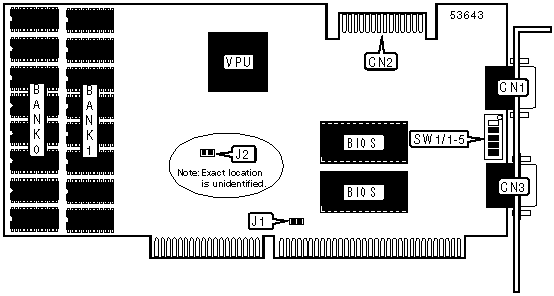
CONNECTIONS | |||
Function | Label | Function | Label |
15-pin analog video port | CN1 | 9-pin digital video port | CN3 |
Feature connector | CN2 | ||
DRAM CONFIGURATION | ||
Size | Bank 0 | Bank 1 |
256KB | (8) 32K x 8 | None |
Note: Prism Eclipse E comes with one bank of DRAM totaling 256KB. Prism Eclipse comes with two banks totaling 512KB. | ||
POWER-UP MONITOR MODE | ||||
Mode | SW1/1 | SW1/2 | SW1/3 | SW1/4 |
VGA | On | On | On | On |
CGA | On | On | Off | On |
MDA | Off | On | Off | On |
EGA | On | Off | Off | On |
MGA | Off | Off | Off | On |
WAIT STATE SELECTION | ||
Setting | J2 | |
| » | 0 | On |
1 | Off | |
BUS SIZE SELECTION | |||
Setting | SW1/5 | J1 | |
| » | Autodetect | On | Off |
8-bit | Off | Off | |
16-bit | Off | On | |


My Books

