


CTL96G-S Tape drive card Settings and Configuration
CONNER PERIPHERALS, INC.
CTL96G-S
Device Type | Internal Tape Drive |
Interface | SCSI |
Format | DDS-3 |
Sustained Transfer Rate | 1,100KBPS 2,200KBPS (compressed) |
Size | 5.25 in. full height |
View | Bottom |

CONNECTIONS | |
Function | Label |
Serial port (pin-out and function unidentified) | CN1 |
USER CONFIGURABLE SETTINGS | |||
Setting | Label | Position | |
| » | MRS Mode disabled | SW1/S4 | On |
MRS Mode enabled | SW1/S4 | Off | |
| » | Parity check disabled | SW1/S5 | Off |
Parity check enabled | SW1/S5 | On | |
| » | Data compression enabled | SW1/S6 | Off |
Data compression disabled | SW1/S6 | On | |
| » | Factory configured - do not alter | SW1/S7 | Off |
| » | Self-Test disabled | SW1/S8 | Off |
Self-Test enabled | SW1/S8 | On | |
Note: MRS (Media Recognition System) Mode enabled allows drive to detect DDS cartridges that support this feature. | |||
DRIVE SELECT ID | ||||
Drive ID | JP1/Pins 1 & 2 | JP1/Pins 3 & 4 | JP1/Pins 5 & 6 | |
| » | 0 | Open | Open | Open |
| 1 | Closed | Open | Open | |
2 | Open | Closed | Open | |
3 | Closed | Closed | Open | |
4 | Open | Open | Closed | |
5 | Closed | Open | Closed | |
6 | Open | Closed | Closed | |
7 | Closed | Closed | Closed | |
Note: If using Pins 1-6 of JP1 for SCSI ID selection, S1, S2, and S3 of SW1 must be set to the ‘Off’ position. | ||||
DRIVE SELECT ID | ||||
Drive ID | SW1/S1 | SW1/S2 | SW1/S3 | |
| » | 0 | Off | Off | Off |
| 1 | On | Off | Off | |
2 | Off | On | Off | |
3 | On | On | Off | |
4 | Off | Off | On | |
5 | On | Off | On | |
6 | Off | On | On | |
7 | On | On | On | |
Note: If using S1, S2, and S3 of SW1 for SCSI ID selection, Pins 1-6 of JP1 must be set to the ‘Open’ position. | ||||
TERMINATION POWER SELECTION | ||
Setting | JP2 | |
| » | TERMPWR supplied by drive | Closed |
TERMPWR supplied by SCSI interface to drive | Open | |
MANUFACTURERS RECOMMENDED MEDIA | ||
Tape | Capacity Without Compression | Capacity With Compression |
90 meter DDS-DC DAT cartridge | 8.0GB (4 Tapes) | 16.0GB (4 Tapes) |
120 meter DDS-2 DAT cartridge | 16.0GB (4 Tapes) | 32.0GB (4 Tapes) |
125 meter DDS-3 DAT cartridge | 48.0GB (4 Tapes) | 96.0GB (4 Tapes) |
Note: Above capacities are achieved by loading 4 cartridges only. | ||
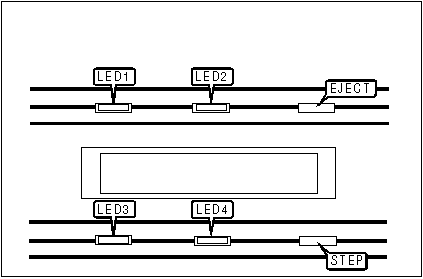
DIAGNOSTIC LED(S) | |||
LED | Color | Status | Condition |
LED1 | Green | On | Cartridge is inserted and does not generate excessive errors |
LED1 | Green | Slow Flash | Cartridge is inserted but generates excessive errors (cleaning may be required) |
LED1 | Green | Fast Flash | Drive could not write to tape correctly - cleaning required |
LED1 | Green | Off | Cartridge not loaded |
LED2 | Amber | On | Drive is reading or writing to the tape |
LED2 | Amber | Fast Flash | A hardware fault occurred or moisture detected on tape |
LED2 | Amber | Off | Drive is not reading or writing to the tape |
LED3 | Green | On | A data compression or decompression operation is in progress on the current cartridge |
LED3 | Green | Off | A data compression or decompression operation is not in progress on the current cartridge |
LED4 | Green | On | A write-protected cartridge is currently loaded |
LED4 | Green | Off | A write-protected cartridge is not currently loaded |
Note: If LED1 flashes slowly during flash of LED2, a prerecorded audio cartridge is inserted and is being played automatically. Use DDS DAT cleaning cartridges only. | |||


My Books

