


AUDIOBLITZ A3100 CLASSIC Sound card Settings and Configuration
GENOA SYSTEMS CORPORATION
AUDIOBLITZ A3100 CLASSIC
Card Type | Sound card |
Chip Set | Unidentified |
Maximum Onboard Memory | N/A |
I/O Options | MIDI/game port, microphone in, line in, volume control, speaker out |
Hard Drives supported | None |
Floppy drives supported | None |
Data Bus | 8-bit ISA |
Card Size | Half-length, full-height card |
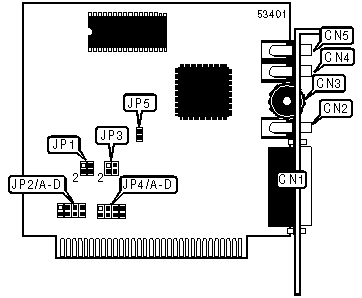
CONNECTIONS | |||
Function | Label | Function | Label |
MIDI/game port | CN1 | Line in | CN4 |
Speaker out | CN2 | Microphone in | CN5 |
Volume control | CN3 | ||
USER CONFIGURABLE SETTINGS | |||
Function | Label | Position | |
| » | Game port enabled | JP5 | Closed |
Game port disabled | JP5 | Open | |
DMA CHANNEL SELECTION | |||||
Channel | JP1/pins 1 & 2 | JP1/pins 3 & 4 | JP3/pins 1 & 2 | JP3/pins 3 & 4 | |
| » | 1 | Open | Closed | Open | Closed |
3 | Closed | Open | Closed | Open | |
I/O PORT ADDRESS SELECTION | |||||
Address | JP2/A | JP2/B | JP2/C | JP2/D | |
| » | 220h | Open | Open | Closed | Closed |
240h | Closed | Closed | Open | Open | |
DIGITAL AUDIO INTERRUPT SELECTION | |||||
IRQ | JP4/A | JP4/B | JP4/C | JP4/D | |
IRQ2 | Open | Open | Open | Closed | |
IRQ3 | Open | Open | Closed | Open | |
IRQ5 | Open | Closed | Open | Open | |
| » | IRQ7 | Closed | Open | Open | Open |


My Books

