


ASB 16 4D IDE Sound card Settings and Configuration
ADLIB MULTIMEDIA, INC.
ASB 16 4D IDE
Card Type | Sound card |
Chip Set | Unidentified |
Maximum Onboard Memory | N/A |
I/O Options | MIDI/game port, CD audio in (4), microphone in, line in, line/speaker out (2), wavetable, Adlib media connector, EIDE interface |
Hard Drives supported | None |
Floppy drives supported | None |
Data Bus | 16-bit ISA |
Card Size | Half-length, full-height card |
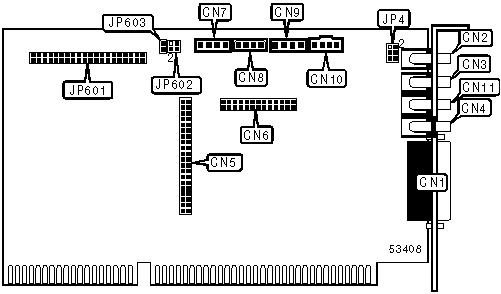
CONNECTIONS | |||
Function | Label | Function | Label |
MIDI/game port | CN1 | CD audio in - Panasonic | CN8 |
Microphone in | CN2 | CD audio in - IDE | CN9 |
Line in | CN3 | CD audio in - Sony | CN10 |
Line/speaker out - front | CN4 | Line/speaker out - rear | CN11 |
Adlib media connector | CN5 | EIDE interface | JP601 |
Wavetable | CN6 | Drive active LED | JP603 |
CD audio in - Mitsumi | CN7 | ||
MICROPHONE TYPE CONFIGURATION | |
Setting | JP4 |
Secondary power for electret or condenser microphone (stereo recording) | Pins 1 & 2 closed |
Stereo to mono microphone mixer (mono recording) | Pins 3 & 4 closed |
Primary power for electret or condenser microphone (stereo recording) | Pins 5 & 6 closed |
EIDE INTERFACE CONFIGURATION | |||
Setting | JP602/pins 1 & 2 | JP602/pins 3 & 4 | |
| » | Secondary EIDE interface enabled | Open | Open |
Primary EIDE interface enabled | Open | Closed | |
Disabled | Closed | Open | |
MISCELLANEOUS TECHNICAL NOTES |
To get a real 4D sound you need to switch the sound card to 4D mode and use 4 speakers. |


My Books

