


PDI8023-16FL Network Card Settings and Configuration
PURE DATA, LTD.
PDI8023-16FL
NIC Type | Ethernet |
Transfer Rate | 10Mbps |
Data Bus | 16-bit ISA |
Topology | Star |
Wiring Type | 62.5/125 m m Fiber optic cable (e.g. Belden 227412) |
Boot ROM | Available |
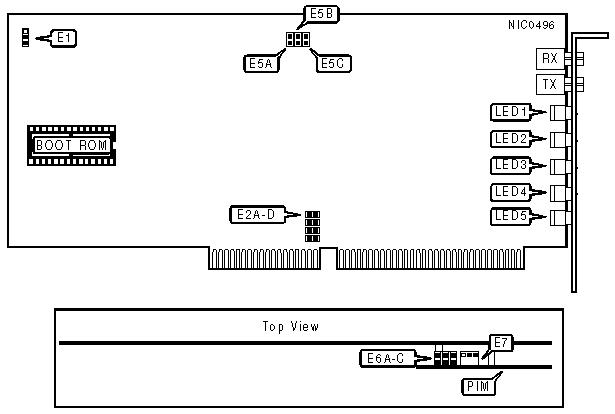
SOFTWARE CONFIGURATION RESET | ||
Setting | E1 | |
» | Normal operation | Pins 2 & 3 closed |
| Reset | Pins 1 & 2 closed |
Note:Many of the options are configured using the setup utility provided with the card. To reset those configurations to the factory defaults, move E1 to the Reset position (pins 1 & 2 closed) and apply power for a few seconds. Always make sure that you turn off the power to the computer before you change any jumpers. | ||
CARD I/D NUMBER | |||||
Number | E2A | E2B | E2C | E2D | |
» | 1 | Open | Open | Open | Closed |
| 2 | Open | Open | Closed | Open |
| 3 | Open | Closed | Open | Open |
| 4 | Closed | Open | Open | Open |
Note:Up to four cards can be installed into a system at the same time. If more than one card is installed each one must have a seperate card I/D number. | |||||
EXTENDED TRANSMIT TIMEOUT AND SIGNAL QUALITY ERROR (SQE) TEST | ||||
Timeout | SQE | E6A | E6B | E6C |
Enabled | Enabled | Closed | Open | Open |
Disabled | Disabled | Open | Closed | Open |
Enabled | Disabled | Open | Open | Closed |
Note:With extended transmit timeout enabled, if the card is transmitting for an extented amount of time the transmission will be interrupted and continued after a preset time. This keeps the card from dominating the network. Signal Quality Error (SQE) is a test of the collision circuitry and path. E6 is located on the PIM. | ||||
LOOP BACK ENABLE | ||
Setting | E7 | |
» | Disabled | Pins 1 & 2 closed |
| Enabled | Pins 2 & 3 closed |
Note:A loop back connector is used with diagnostic software to trouble-shoot the card. E7 is located on the PIM. | ||
FACTORY CONFIGURED SETTINGS | |
Jumper | Setting |
E5A | Closed |
E5B | Open |
E5C | Open |
DIAGNOSTIC LED(S) | |||
LED | Color | Status | Condition |
LED1 | Green | On | Data is being transmitted |
LED1 | Green | Off | Data is not being transmitted |
LED2 | Amber | On | Data is being received |
LED2 | Amber | Off | Data is not being received |
LED3 | Amber | On | Network connection is good |
LED3 | Amber | Off | Network connection is broken |
LED4 | Red | On | Card is transmitting for an extended time |
LED4 | Red | Off | Normal operation |
LED5 | Red | On | Collision detected on network |
LED5 | Red | Off | Normal operation |


My Books

