


EISA 32-BIT MASTER BUS ETHERNET ADAPTER Network Card Settings and Configuration
KATRON TECHNOLOGIES, INC.
EISA 32-BIT MASTER BUS ETHERNET ADAPTER
NIC Type | Ethernet |
Transfer Rate | 10Mbps |
Data Bus | 32-bit EISA |
Topology | Linear bus |
Wiring Type | Shielded/Unshielded Twisted Pair AUI transceiver via DB-15 port RG-58A/U 50ohm coaxial |
Boot ROM | Available |

FACTORY CONFIGURED SETTINGS | |
Jumper | Setting |
JP2 | Pins 1 & 2 closed |
JP3 | Pins 2 & 3 closed |
NETWORK VERSION | ||
Version | JP5 | |
| » | Ethernet Version 2 (can use all ports) | Pins 1 & 2 closed |
Ethernet Version 1 (uses AUI port only) | Pins 2 & 3 closed | |
LINK INTEGRITY TEST | ||
Setting | JP6 | |
| » | Enabled | Pins 1 & 2 closed |
Disabled | Pins 2 & 3 closed | |
Note:The link integrity test is only valid when the cable type is unshielded twisted pair. | ||
CABLE TYPE | ||
Type | JP7 | |
Shielded/Unshielded Twisted Pair | Pins 1 & 2 closed | |
AUI transceiver via DB-15 port | Pins 2 & 3 closed | |
| » | RG-58A/U 50ohm coaxial | Pins 3 & 4 closed |
SEGMENT LENGTH | ||
Maximum Length | JP8 | |
| » | 185 meters | Pins 1 & 2 closed |
300 meters | Pins 2 & 3 closed | |
Note:Segment length is the total length of cable between the two farthest cards on the segment. Each card on the segment must have this option set the same. | ||
ONBOARD TERMINATOR | |||
Setting | JP9 | ||
| » | Disabled | Pins 1 & 2 closed | |
Enabled | Pins 2 & 3 closed | ||
Notes:If the card is on either end of a linear bus network segment, the onboard terminator may be used instead of using an external terminator.
| |||
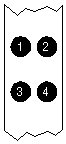
DIAGNOSTIC LED(S) | |||
LED | Color | Status | Condition |
LED1 | Green | On | Link is correctly configured |
LED1 | Green | Blinking | Link is incorrectly configured |
LED1 | Green | Off | Twisted pair connection not used/Link test is disabled |
LED2 | Yellow | On | Twisted pair polarity is reversed and corrected |
LED2 | Yellow | Off | Twisted pair polarity is correct/Twisted pair connection not used |
LED3 | Green | On | Card is not powered or has failed |
LED3 | Green | Blinking | Data is being transmitted or received |
LED3 | Green | Off | Data is not being transmitted or received |
LED4 | Yellow | On | Collision detected on network |
LED4 | Yellow | Off | No collisions detected on network |


My Books

