


TPT-D4 Network Card Settings and Configuration
CABLETRON SYSTEMS, INC.
TPT-D4
Device Type | Redundant Transceiver |
NIC Type | Ethernet |
Maximum Onboard Memory | Unidentified |
Boot ROM | Not available |
Network Transfer Rate | 10Mbps |
Topology | Star |
Wiring Type | Unshielded twisted pair |
Data Bus | External |
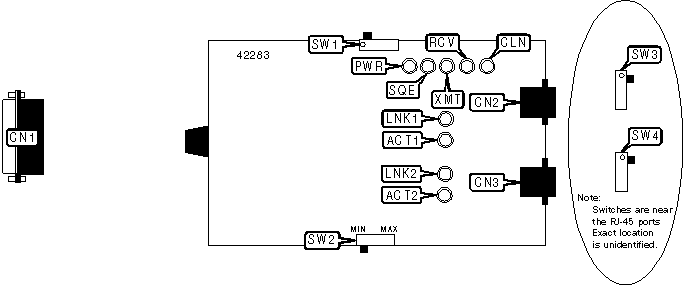
CONNECTIONS | |||
Function | Label | Function | Label |
AUI transceiver via DB-15 | CN1 | RJ-45 UTP connector (port 2) | CN3 |
RJ-45 UTP connector (port 1) | CN2 | ||
USER CONFIGURABLE SETTINGS | |||
Function | Label | Position | |
| » | SQE test function disabled | SW1 | Off |
SQE test function enabled | SW1 | On | |
Waits for data for approximately 2sec before switching to redundant port | SW2 | MIN | |
Waits for data for approximately 10sec before switching to redundant port | SW2 | MAX | |
Note: SW2 should be set to MIN when attached to a high-activity network. The MAX setting should be used with a low-activity network. | |||
PORT 1 PIN CONFIGURATION | |
Setting | SW3 |
Crossover enabled | On |
Straight-through enabled | Off |
PORT 2 PIN CONFIGURATION | |
Setting | SW4 |
Crossover enabled | On |
Straight-through enabled | Off |
DIAGNOSTIC LED(S) | |||
LED | Color | Status | Condition |
PWR | Green | On | Power is on |
PWR | Green | Off | Power is off |
SQE | Yellow | On | Signal Quality Error test function is enabled |
SQE | Yellow | Off | Signal Quality Error test function is disabled |
XMT | Green | Blinking | Data is being transmitted |
XMT | Green | Off | Data is not being transmitted |
RCV | Yellow | Blinking | Data is being received |
RCV | Yellow | Off | Data is not being received |
CLN | Red | Blinking | Collision detected on network |
CLN | Red | Off | No collision detected on network |
LNK1 | Green | On | Port 1 UTP link is good |
LNK1 | Green | Off | Port 1 UTP link is broken |
ACT1 | Yellow | On | Port 1 is handling network traffic |
ACT1 | Yellow | Off | Port 1 is not handling network traffic |
ACT1 | Yellow | Blinking (slow) | Port 1 is idle. Time out is set to 10 seconds |
ACT1 | Yellow | Blinking (fast) | Port 1 is idle. Time out is set to 2 seconds |
LNK2 | Green | On | Port 2 UTP link is good |
LNK2 | Green | Off | Port 2 UTP link is broken |
ACT2 | Yellow | On | Port 2 is handling network traffic |
ACT2 | Yellow | Off | Port 2 is not handling network traffic |
ACT2 | Yellow | Blinking (slow) | Port 2 is idle. Time out is set to 10 seconds |
ACT2 | Yellow | Blinking (fast) | Port 2 is idle. Time out is set to 2 seconds |


My Books

