


DE-320CT Network Card Settings and Configuration
D-LINK
DE-320CT
NIC Type | Ethernet |
Transfer Rate | 10Mbps |
Data Bus | 16-bit MCA |
Topology | Linear Bus/Star |
Wiring Type | Unshielded twisted pair RG-58A/U 50ohm coaxial |
Boot ROM | Available |
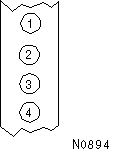
DIAGNOSTIC LED(S) | |||
LED | Color | Status | Condition |
LED1 | Green | On | Power on |
LED1 | Green | Blinking | Data is being transmitted/received (UTP only) |
LED1 | Green | Off | Power off |
LED2 | Green | On | Network connection is good |
LED2 | Green | Blinking | Data is being transmitted/received (UTP only) |
LED2 | Green | Off | Network connection is broken |
LED3 | Yellow | On | Collision detected on network |
LED3 | Yellow | Off | No collision detected on network |
LED4 | Yellow | On | Network connection is broken (BNC only) |
LED4 | Yellow | Blinking | Card is transmitting for an extended time (jabber) |
LED4 | Yellow | Off | Normal operation |


My Books

